hello I'm an elk oohs new VP of
technology at alga sec and today I am
going to demonstrate the alga sec and
Cisco ACI integration before we get
going just a few words on alga SEC
security today is all about driving your
business our unique approach to security
policy management helps make some of the
world's largest and most complex
organizations more agile more secure and
more compliant through a single pane of
glass alga SEC provides holistic
visibility across the entire network
security infrastructure including
business applications and their
connectivity flows on premise and across
Sdn and private or public cloud
architectures and supporting all
industry-leading security devices with
algo SEC you can proactively analyze
risk from the business perspective
intelligently automate time-consuming
security changes and enhance them with
business context and also type honor
abilities and cyber threats to critical
business processes all with zero touch
and seamlessly orchestrated across any
heterogeneous environment algo SEC
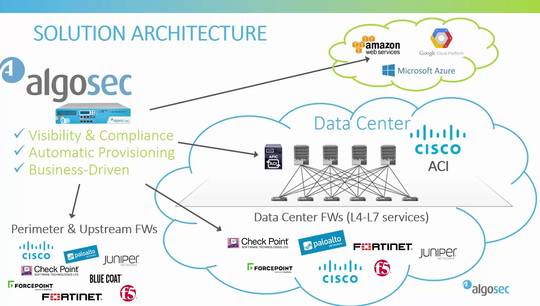
seamlessly integrates with Cisco ACI to
enhance security policy visibility and
deliver change risk and compliance
management for next-generation data
centers algo SEC incorporates the Cisco
epoch configurations applications
contracts filters and DB G's with the
underlying firewall configurations of
Cisco's as well as other vendors
security devices both inside the ACI
fabric and outside to provide full
end-to-end security visibility in
addition alga so greatly enhances Cisco
ACI automation capabilities and extends
supposed to change automation to all
other firewalls and routers both inside
and outside the data center al cosec
also enforces compliance through every
security policy change to ensure that
the organization is agile continuously
compliant and secure now let's see the
integration in action
okay so this is the alga SEC firewall
analyzer I have defined here a device
group called data center one consisting
of the Cisco ACI itself as well as the
underlying firewalls in the fabric these
can be Cisco firewalls or from other
vendors we can also see here a network
mapper presentation of these firewalls
and the connectivity between them based
on the routing information you can also
see the networks that these firewalls
protect this network map model will also
serve as the basis for traffic
simulation and further analysis we will
shortly see okay so we talked about
visibility before now let's see how easy
it is to find all the rules in all the
policies related to some network we're
interested in I will just click on the
policy tab and search for the 100
Network for example now I can see that
this network appears both in the Cisco
ACI contracts under this EPG inside and
also in many rules within one of the
underlying firewalls switching to the
changes tab we can see information about
changes to configuration either to the
ACI itself the contracts and images or
to the underlying firewalls in this data
center this will allow us to make sure
everything stays in sync and there are
no out-of-band changes now let's have a
look at risk and compliance so looking
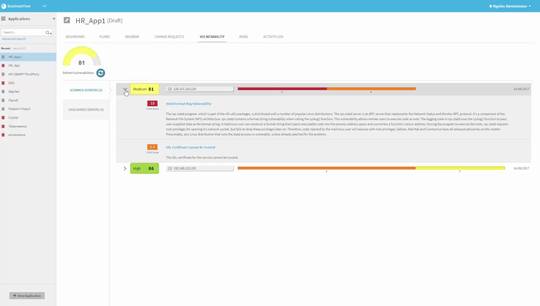
at the latest report on the cisco ACI I
can now see some information about risks
this analysis is based on a risk profile
in this case the out-of-the-box built-in
risk profile based on industry best
practices but it can also be customized
according to your own needs and policy
so in this case we can see here a risk
about FTP entering the network drilling
down into it will reveal some more
information about why this is considered
risky and some more details about the
exact contracts that are causing this
risk to be raised we also have a
regulatory compliance tab where we can
see some prefilled compliance reports
of all the main regulatory compliance
standards from the different industries
so for example the PCI compliance report
will hold a template a prefilled report
with the different PCI requirements and
their status for this ACI configuration
this can save many many hours of
preparation for compliance audits now
let's talk about change automation one
of the great values of ACI is the
ability to quickly deploy new
applications or extend existing ones or
easily move payloads around etc but what
about the firewalls both inside and
outside the ACI fabric let's see how
I'll go SEC can close the loop and
automate that part too so this is fire
flow or change automation piece I will
now create a new change request to open
a new connectivity flow from this source
to some destination with some services
I'm doing this manually from the UI but
it can also be done via API is
automatically so the change can be
triggered by orchestration systems such
as cloud center or others so let's
create the change request and now we are
on to the next step
where far flow will automatically detect
which firewalls are in path and the
relevant that need to be changed this is
using the network map we saw before to
decide which firewalls are on the way in
this case two firewalls are blocking the
traffic so we'll continue confirm the
devices and next fire flow will run a
risk check and what-if analysis
providing information about which risks
will be raised if this request will
indeed be proved and implemented in this
case we can see some risk is involved
while Microsoft services but we will
prove it anyway now file flow will
decide how to implement this request so
it will decide which objects need to be
created which rules need to be added or
updated and even create in the case of
Cisco a size for example create a CLI to
be pushed to the
and if I click on the implement on
device button it will actually push the
changes to the Cisco and of course in a
similar way for other firewall vendors
note that fire flow implements the
changes on the firewalls by adding or
updating specific rules it does not
override the entire policy so it's
suitable for use with brownfield
environments as well and it is able to
detect and marriage out of band changes
now this entire process that I just
presented step by step can be fully
automatic with zero touch all the steps
along the way will still be executed but
if our flow will proceed
automatically but it's also possible to
define exceptions so for example if
risks are detected you want someone to
manually approve the request and then
continue with the automatic execution
and so this way you can implement full
automation but still do it responsibly
and allow human intervention only when
needed thank you for watching this demo