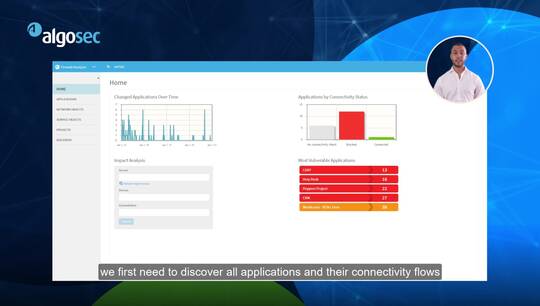
hello I'm Anelka schnell VP of
technology at algo six in the next few
minutes I will present and demonstrate
the algo sex security incident response
app for IBM qradar we will see how using
algo 6 can expedite and automate the
handling of security incidents and
breaches and reduce their impact on
business but first some context cyber
operations or security analysts analyze
many alerts and events coming from
multiple sources they typically use
scene solutions such as QRadar for this
task their goal is to detect security
breaches report the incident to the
relevant people then analyze the
potential impact of the breach and of
course stop or it will contain the
attack to minimize its damage Alba SEC
and specifically the QRadar security
incident response app highlights which
business applications may be relevant
for the incident as well as how critical
they are it can also provide visibility
into the exposure of the compromised
server to the Internet for example to
assess the risk of data leakage or its
connectivity to internal more sensitive
networks this provides the security
analysts with key information regarding
the severity and urgency of the incident
algo SEC can also automate the
remediation process of security
incidents the analyst can trigger
automatic isolation of the compromised
server from the network leaving access
only for forensic purposes for example
all in a single click understanding the
business impact of the incident will
also allow to quickly identify who are
the relevant technical and business
people to report the incident to so
let's see the Albuquerque radar app in
action so here is my cue radar and now
let's say that I'm investigating the
incoming logs looking for suspicious
activity in this case let's say that the
this IP address I suspect it might be a
compromised server for some reason I'll
right-click on that go to more options
and I can see that they have now two new
options
curity incident analysis and isolate
server let's first go to security
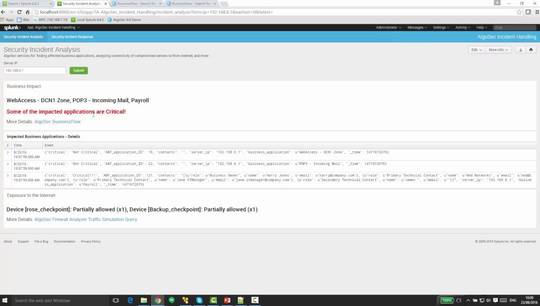
incident analysis so new window opens up
with some more information about this
server so first let's take a look at the
business impact so we can see here a
list of all the business applications in
which this server is a part of meaning
if the server goes down there might be
some impact on these business
applications I can also see here some
indication whether these applications
are considered critical or not if I want
to further drill down a business flow
page opens with some more information in
this case let's take a look at the
payroll application which is considered
critical you can see here that this IP
address is indeed part of the flows
supporting this application and in
addition we see information about the
application itself the relevant people
in both business owner and technical
contacts so we have some more
information about where to proceed from
here okay going back we can see here we
also have information about the network
connectivity of this server specifically
here we have an example with the
exposure to the Internet from this IP
address to the Internet and we can see
here that there are several firewalls
along the way blocking some of the
traffic from this server to the Internet
however one of them appears to be
allowing the traffic or at least part of
it let's have a look at some more
details so here are the traffic
simulation query results from the other
tech firewall analyzer we can see here
the full path that this traffic will go
through from this suspicious server to
the Internet with all the relevant
firewalls along the way and in this case
we can see that one of the firewall the
checkpoint is actually allowing some of
the traffic so in this case we can see
this is the relevant rule and it allows
HTTP and FTP to go out all the way to
the Internet this is a potential for
data leakage
okay so we've gathered some information
about this
the incident and about the server and
now we'll probably inform some people
but in the meantime we also want to
isolate this server from the network to
avoid any further damage so let's do
that so again a right-click on the
server
more options and isolate server a new
window opens and now we can provide some
more information about the server and
issue a new change request to fire flow
the algo circular workflow piece and I
will hit isolate here and now a new
change request was opened requesting to
block the traffic to and from this
server let's see some more information
about this change request we can now see
this request has reached I would like
fire flow we can see some information
about this traffic request in this case
to block all traffic from this server or
to this server alternatively another use
case could be to leave access only for
forensics purposes and now depending on
how the workflow was customized this can
be either fully automatic zero-touch
meaning fire flow will go find all the
relevant firewalls and the issue the
exact changes that need to be done for
them and go ahead and push the changes
to the firewalls so zero touch from the
minute you click isolate and curator
until it actually happens it's maybe a
minute or two or alternatively if the
workflow is set so that some approval
steps are required along the way then
that's what will happen you have the
full flexibility to control this process
fire flow also keeps full documentation
of this change so after the server is
patched and ready to get back to the
network you can easily undo this change
so now that the incident is contained we
can go on our work and look for
additional incidents thank you