hello I'm professor wall today we'll be
discussing how to intelligently select
security groups to modify when managing
changes in your AWS environment so let's
recap - some of the things we talked
about in a previous lesson so in the AWS
environment you can associate multiple
security groups to each instance so
let's look at an example of how that
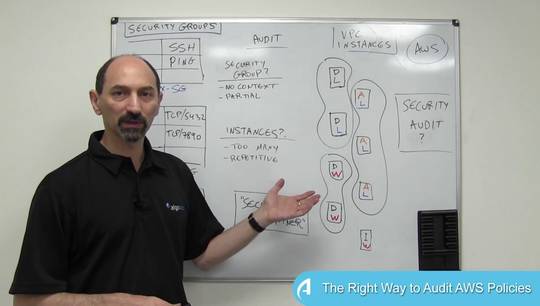
might be arranged so in this example I
have over here 8 instances 8 VMs and in
the boxes I've sketched out the
organization of security groups so to
make it interesting I've associated each
instance with its own special security
group that is installed only only on it
so there are 8 of these black security
groups one per instance then we have
another set of security groups in the
blue that are regional so we have at the
top here a security group that is for
the European instances that's associated
with VMs 1 to 4 and then we have the
security group associated with the
American instances VMs 5 to 8 in this
example then we also have one very broad
security group that I've labeled web
that is associated with all of the MS
all the VMS because let's say they're
all running web servers of various types
so each VM in this sketch has really
three security groups associated with it
its own special security group then the
regional security group and then finally
the broad security group for the whole
set of web servers and this is you can
organize your VM - security group
Association in many different ways this
is a relatively structured example to
show what I'm trying to show here so
you've done all this being in the past
and now you have a new application
rolling out and the application owners
want to add traffic from some system X
using the HTTP protocol to the VMS one
two three four and six the VMS that i've
marked here with red stars those are the
VMS that are going to be part of this
new application and you are requested to
make it happen and add rules to the
security group so that this type of
traffic is allowed by the security
filtering rules so obviously you need to
write an incoming rule on some security
groups that are associated with these
five VMs and the question that I would
like to pose here is the question which
security groups should you modify to
make this happen so the thing is there
is quite a lot of choice to be thought
about here there are several different
ways of approaching the problem so let
me share with you a few the first thing
that you could do is try to minimize
your own work so just do the least
amount of work manually and to do that
basically you'd want to minima to modify
the smallest number of security groups
that get the job done in this example
you could put this rule in the web
security group so you make one rule
change in one security group and this is
going to be enough because the web
security group is associated with all
the VMS that you care about numbers one
to four and number six
so that's minimizing the effort for the
administration this is the downside of
this direction is that you have a lot of
side effects you're actually allowing
this traffic also to go to VMS 5 7 & 8
that were not part of the original
request so that those are side-effects
which you potentially want to minimize
the other direction is to use the
principle of least privilege so you want
to allow the requested traffic to go
only to the places that it must reach
but into nowhere else
and to do that one way of doing it is
being very very specific so you can add
the rule to each of the individual
security groups so security groups one
two three four and six so you write five
separate rules on these five separate
security groups and you get the job done
it's obviously the most specific so
there are no side effects which is good
but you work pretty hard to do all that
and then there are other considerations
and I haven't even touched on such as
application context well this rule that
I'm showing you here is a web type rule
so maybe it makes sense to put it in the
web application security group because
it fits what about future proofing well
the requesters wanted vm's one to four
and v-n number six but maybe from your
experience you are assuming that they're
going to be adding vm seven and eight to
this next week so you might want to
preempt that and add the rule to
security groups that will cover the
future expansion then there is a
question of capacity perhaps one of
these security groups is already close
to the maximum number of rules that are
allowed by AWS so you want to keep some
give yourself some cushion and not
overload that security group and then
there are other options you can you
fight you can find a middle ground in
this particular example you could add
the rule to the European security group
covering VMs one two four and also just
to the security group number six
covering vm six so you just make two
changes and you touch exactly the VMS
that you need without any side effects
this is a carefully constructed example
but you can see that there there are
multiple ways of thinking about the
problem and there are different aspects
that you might want to optimize sir's
there is some some food for thought here
and some need for creativity and also
for structures so bear these types of
considerations in mind when you build
your structure of security groups and
also when you're thinking about where to
make a change thank you for your
attention